AI
So many emotions are generated by those two letters. For some, it’s an exciting new frontier. For others, it is the beginning of the end of civilization as we know it. Me? I’m still conflicted. On one hand, the technology is impressive when it solves problems quickly and fascinating to see how fast it improves. But I also worry about the future it’s going to pave. There are so many unknowns, risks, and lack of guardrails & safety nets. There’s the environmental impact from data centers popping up everywhere. I have three kids who are going to be set free into a world that I can’t even imagine when they graduate. It’s exciting and terrifying at the same time.
At the end of the day, AI is here whether I use it or not. I have no interest in using it to generate artwork for me or create something amazing for the purpose of saying “Look what I created!” (though in the early days of AI-generated images, it was fascinating to play with). The best take I’ve read on AI for creative work is here by The Oatmeal. What I have found it useful for is research, helping me flesh out ideas and organizing data. When Claude Code and Cowork came into the picture, I started to think more about how I can get AI to help me solve problems and tasks that I hate dealing or struggle with. Things like creating an inventory spreadsheet for my future apparel business. Sorting through tons of data for my taxes. I’ve been using it a lot to help me with JavaScript for my websites, solving Kirby CMS problems I have, and building simple Mac and iOS test apps to create special animations and interactions. It’s slowly becoming a big asset to my daily work. However, I always think to myself, “How would I feel if all the AI data centers suddenly disappeared from this earth?” I don’t think I’d mind that at all, to be honest.
Bugbot
One evening as I was organizing our archaic Notes.app page of features planned, I kept thinking about that dream Mac bug and feature tracking app that I’ve always wanted. Hmm…could I try to build it? Maybe a prototype? I design apps for the Mac, but I have no business trying to build an app for the Mac, not even with agentic coding. I don’t know much about coding on the Mac or iOS side to even begin to tell Claude what to do and how to do it in an efficient way. But I do know how to build websites and understand how things work there! So I decided to see if I could build a simple bug tracking app that maybe our company can use internally. If it’s bad, then I entertained and educated myself for a few hours that night. I had nothing to lose.
My experience building this website has been interesting. Usually when building a website like this, a ton of planning has to be done before any code is written. Since I had no intention of writing any code or designing anything myself for this little project, I started telling Claude (Code) how I wanted the file/data structure set up, and all the basic necessities of an extremely simple bug tracker. I wanted a basic starting point that I could build upon. And in a few minutes, I had a functioning bug tracker. Over the next few days I directed Claude to build new features, keeping the task focused, and when the feature was complete and functioning, I told Claude how I wanted it to look and function differently (if changes needed to be made). If I were working with real developers on a project like this, there’s no way I would be able to work like this. “Build this feature. Oh that doesn’t work well. Build it like this. No, I don’t like how that feels. Can you try this?” Can you imagine all the wasted time and frustration? With Claude, I can direct changes, test it, and keep changing things until I’m happy. And it happens in a matter of a couple minutes. Functionally, I have built the bug tracking software that I have always wanted because of this and in blazing time.
Once we got it up on the server where all of us could access it, everyone played around with it for a few hours before we finally cleared all the test data and I went to work adding actual bugs and feature tickets that have been sitting in our notes app. Using the app with real data revealed many flaws in the initial design. I’d jot down notes throughout the day of things that bugged me and how I could improve it. Other team members sent me things that bugged them as well. In the evening I would take the time getting Claude to fix issues and improve the UX. It was rinse and repeat over a few days of actual use and while it isn’t perfect yet, it is so much better than any other bug tracking software I have ever used. Would I ever consider this a shippable product to the public? No way. As amazing as Claude is at being able to build something like this, It made many mistakes and did things the wrong way even though I already told it how I wanted things to be done. If I can see many inefficiencies Claude decided to use, there must be other things that I don’t understand that’s poorly optimized. Sometimes when I would tell it to make a change, many lines of old code would still sit in the file untouched. You can’t blindly trust it to build a product for you and expect a polished result. You need to have an idea of what it is doing so you can catch mistakes. But it will continue to get better and that’s kind of scary?
A tour of Bugbot in its current state (as of this writing):
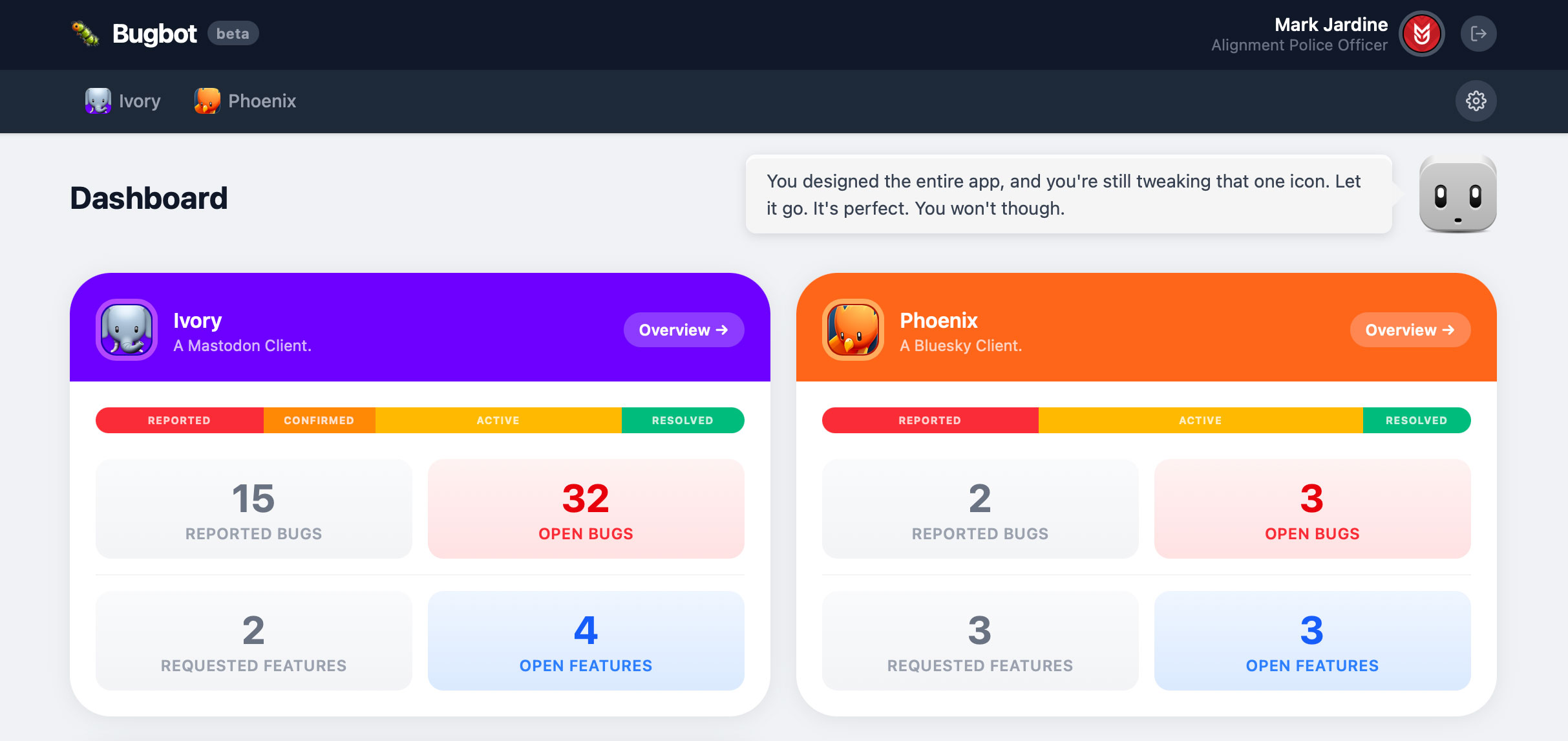
I decided to stick with the obvious naming convention for a traditional Tapbots app. At one point I was going to design an icon for it, but decided to keep things simple and stick with emojis. You might notice my strange job title. More about that when I get to the settings.
As for the bot head with the speech bubble, well that was another way of me injecting some joy into a bug tracker. You’ll see him appear on various pages, but he’s far more complex than one would imagine. For one, he animates and has sounds. His quip stays the same across all pages for 20 minutes or so before he animates and shares a new random quip. Of course if you click on him, he will animate immediately and provide you a new quip. The logic for the quips is my favorite part about him. More on that later.
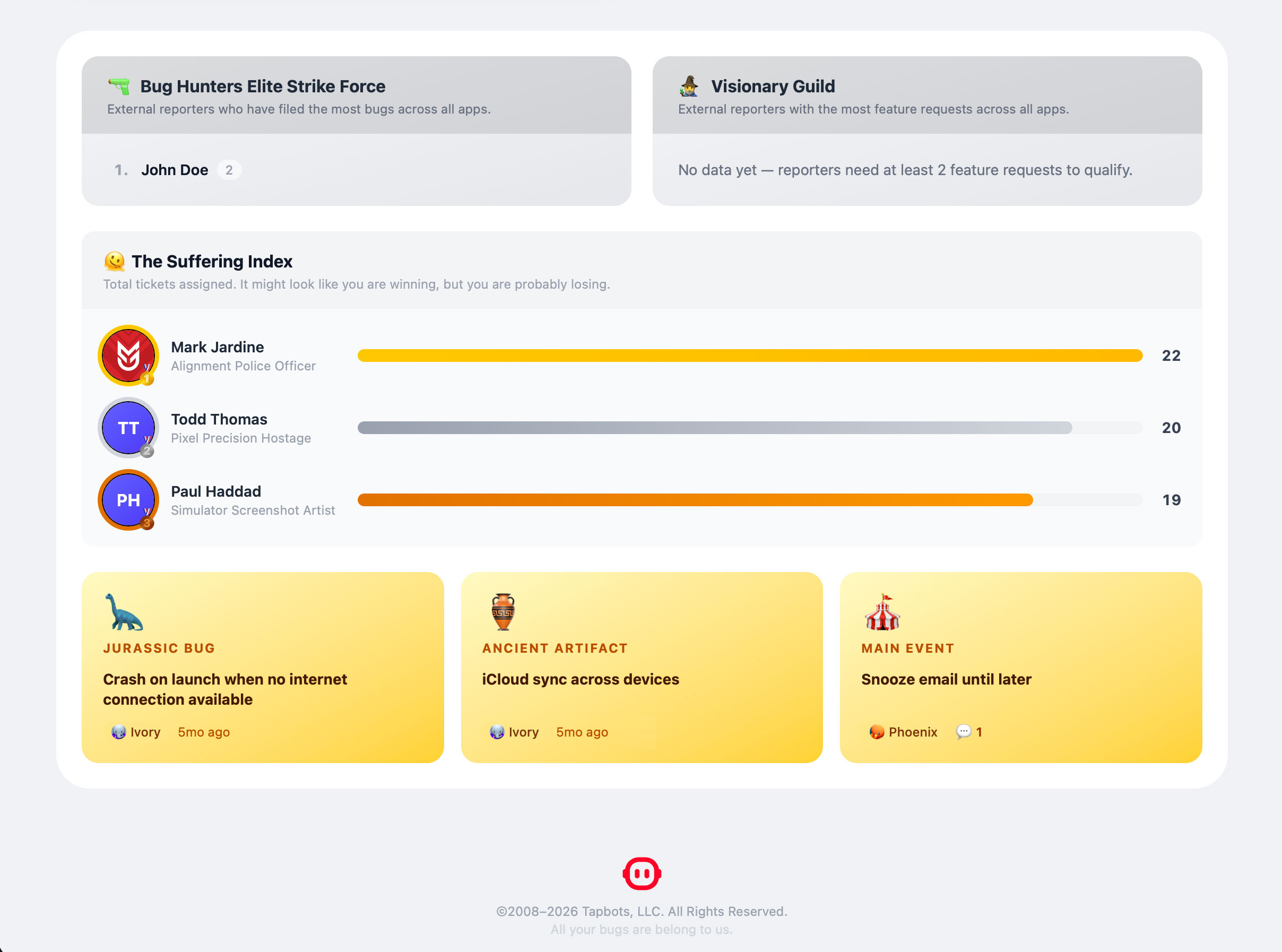
At the bottom of the dashboard, I wanted to add some pointless, but entertaining data points. Most are self-explanatory. Jurassic Bug is the oldest bug report that is still open on the site, Ancient Artifact is the oldest feature request, and Main Event is the ticket that has the most notes on it.
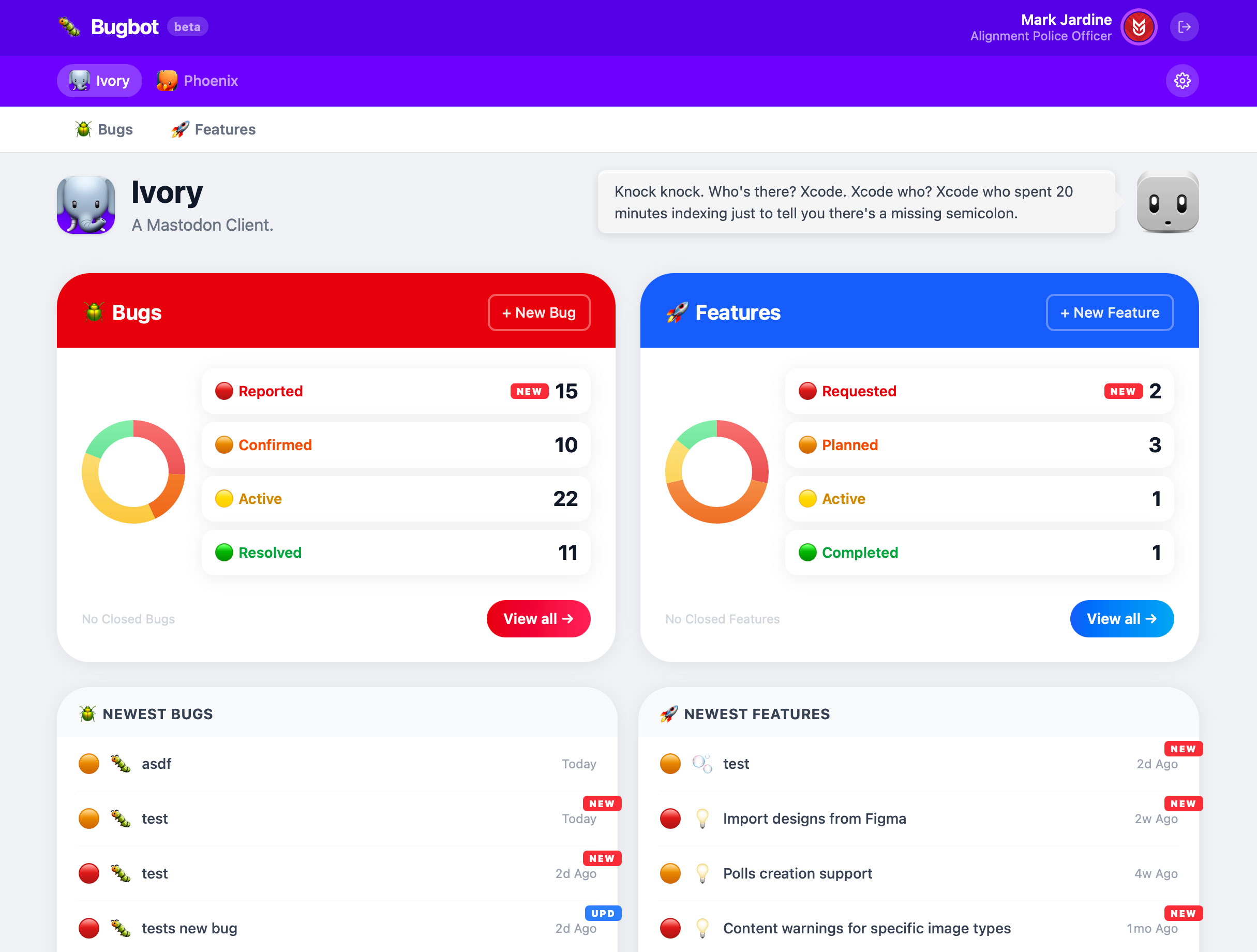
When you drill into a specific app, you get this overview page. I thought it was a nice touch to tint the header with the dominant app color. You’ll notice I have Bugs as Red and Features as Blue (it was also on some of the buttons on the main dashboard that was shown previously). Also worth noting is I wanted to color-code the status of each ticket. Bugs and Features are slightly different, but I still wanted them to follow the same color coding (from red to green).
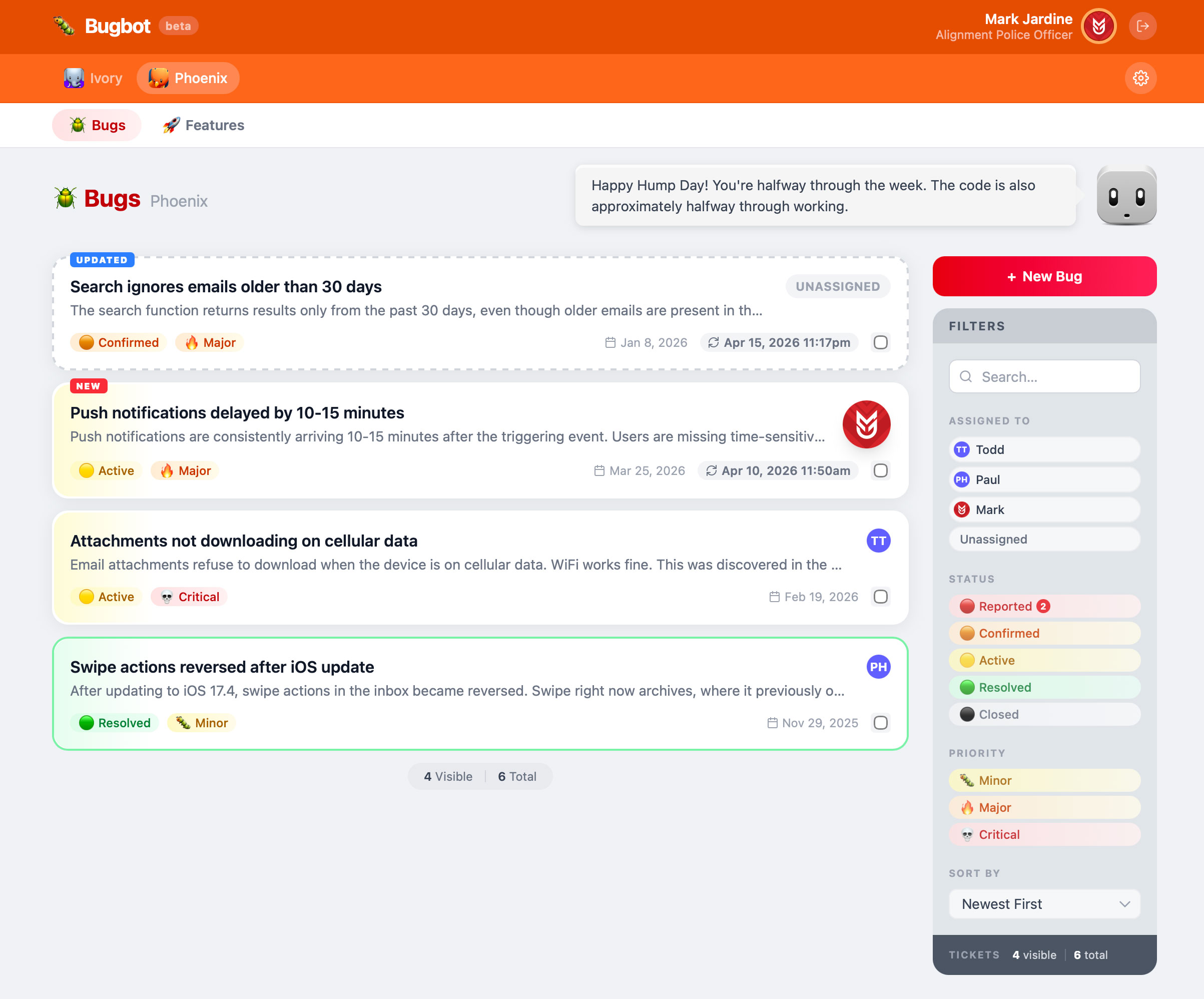
The ticket list page is where I spent most of my time iterating on. Being able to find, filter and organize tickets quickly is important for a bug tracker. Reported and Closed tickets DO NOT show up in the list of tickets by default. That’s why I added number counts to the right of them in the filter sidebar. We will be aware that they exist, but don’t have to let them clutter tickets that need to be addressed. All the actions in the filter sidebar are instant. Start typing in search and the list of tickets shows results instantly (searches titles and descriptions at this point) and reported and closed tickets also show up in the search results. You can toggle on one row in each section (assigned to, status, priority) to get the list you want to work on. All filters are reflected in the URL so you can bookmark a specific configuration, and the last set filters are always remembered for each section (app->bugs, app->features). These are all things I added as iterations from my annoyance at not having them initially.
The tickets themselves are color-coded on the left side based on their status, unassigned tickets are kept gray with dotted lines so they are obvious. Completed tickets get a nice green outline which makes me feel good when I see a lot of them. Your own avatar appears larger than the others and there’s a small “new” and “updated” badge for tickets you haven’t seen yet or haven’t seen since it has been updated in some way.
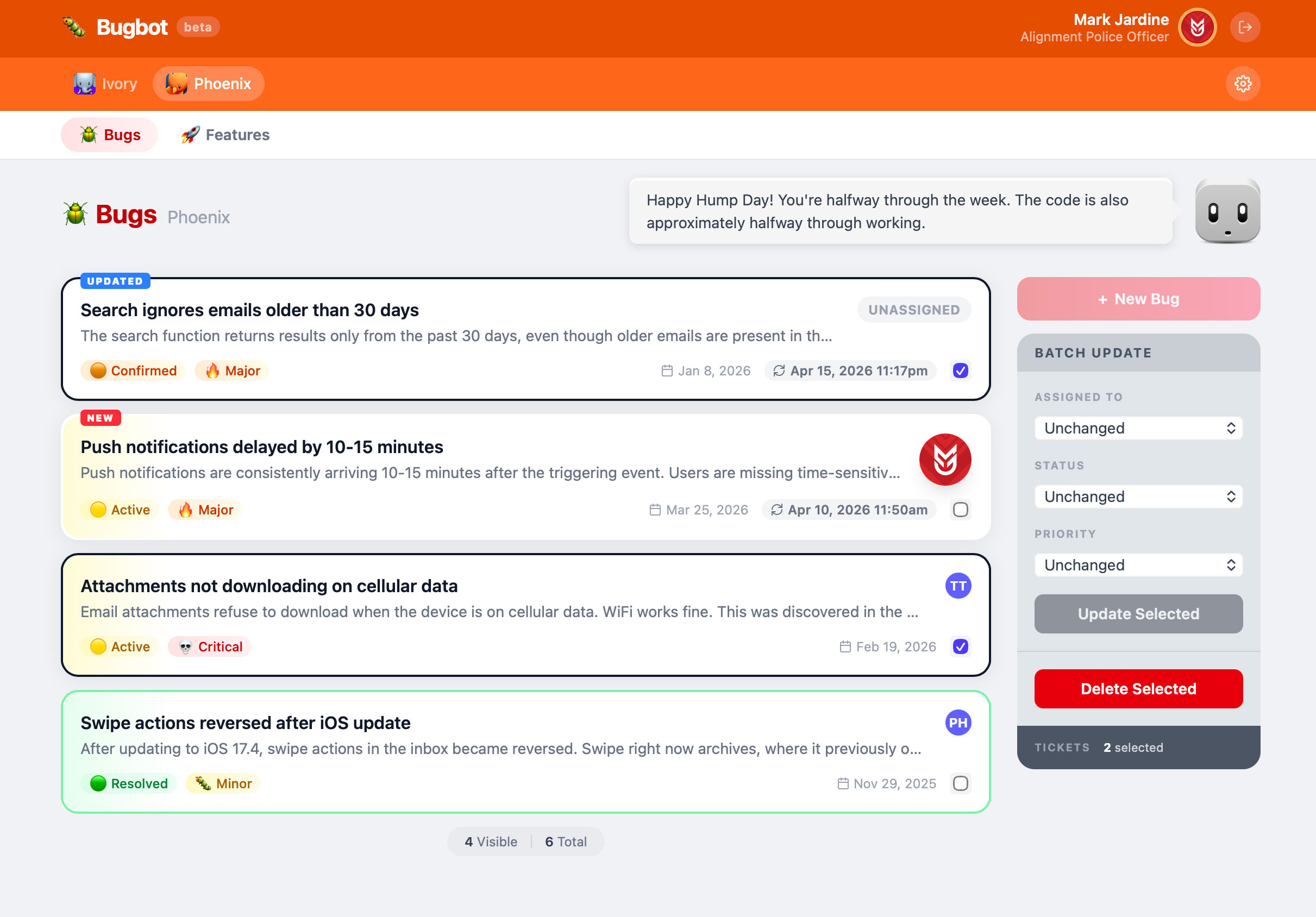
When you select a ticket (checkbox in the bottom right corner of each ticket), the filter sidebar turns into “batch update” and it allows you to quickly make some changes to multiple tickets. Selected tickets get a nice black outline so it is clear which ones are going to get updated.
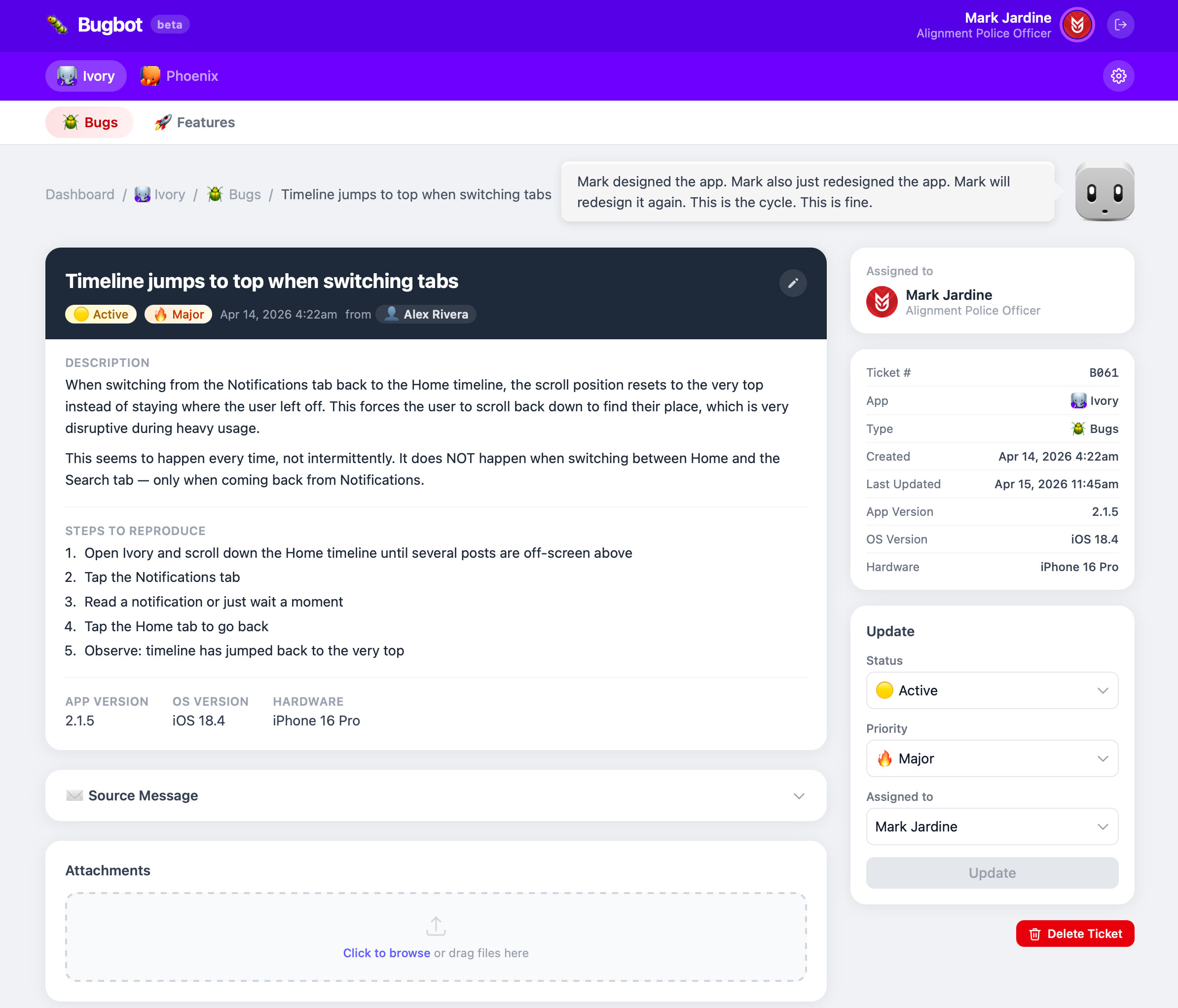
The ticket detail view is straightforward. The description and steps fields display Markdown. The source message is a text file of the original email sent in if we need to refer to it. One neat feature is if you click on the name of the person who reported it, it will open up a new email directed to them, the subject line will have the ticket number and title, and the source message is injected into the body of the email as an indented quote. I wanted a way to quickly send them an email, but not lose context.
You can add attachments and write notes for each attachment. This is more useful on the features side, but if someone sends text files or images alongside their bug report, it will be there.
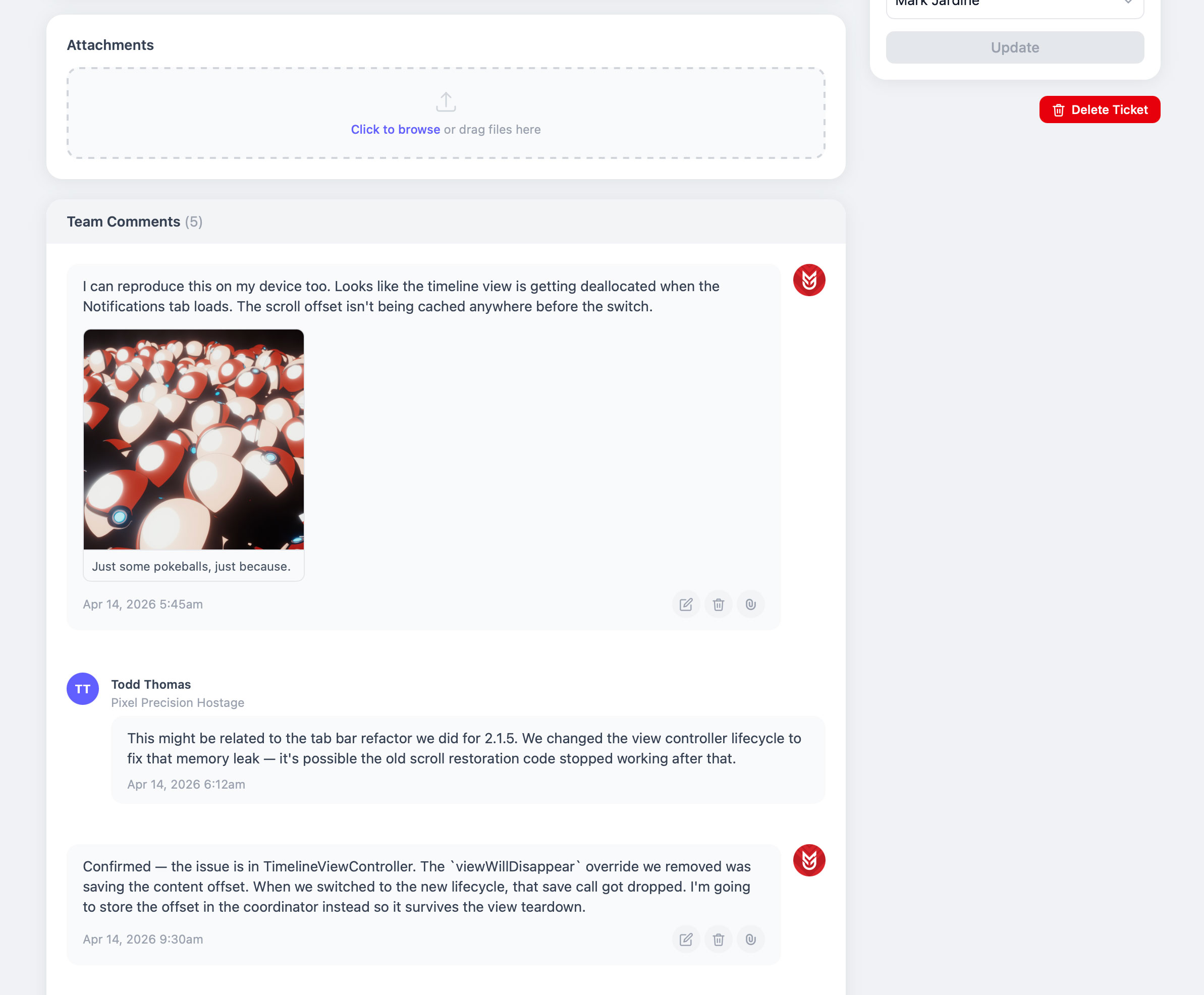
Under attachments, members of the team can write comments relevant to each ticket. They can also upload files here and add notes to the files.
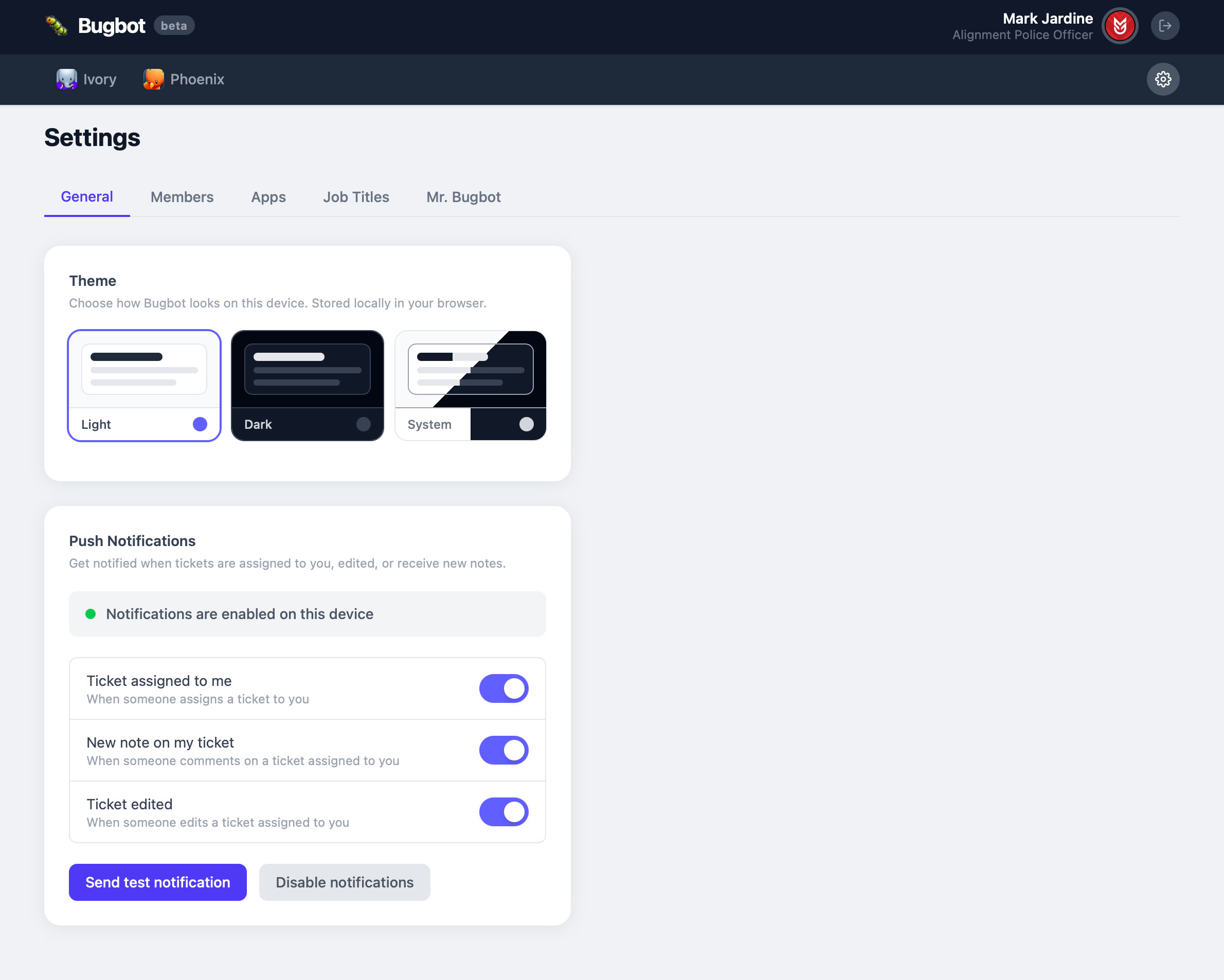
The settings area is like peeking behind the curtain and seeing the Wizard of Oz. I recently added push notifications because I had no idea tasks were getting assigned to me throughout the day if I wasn’t actively looking at and refreshing pages in Bugbot.
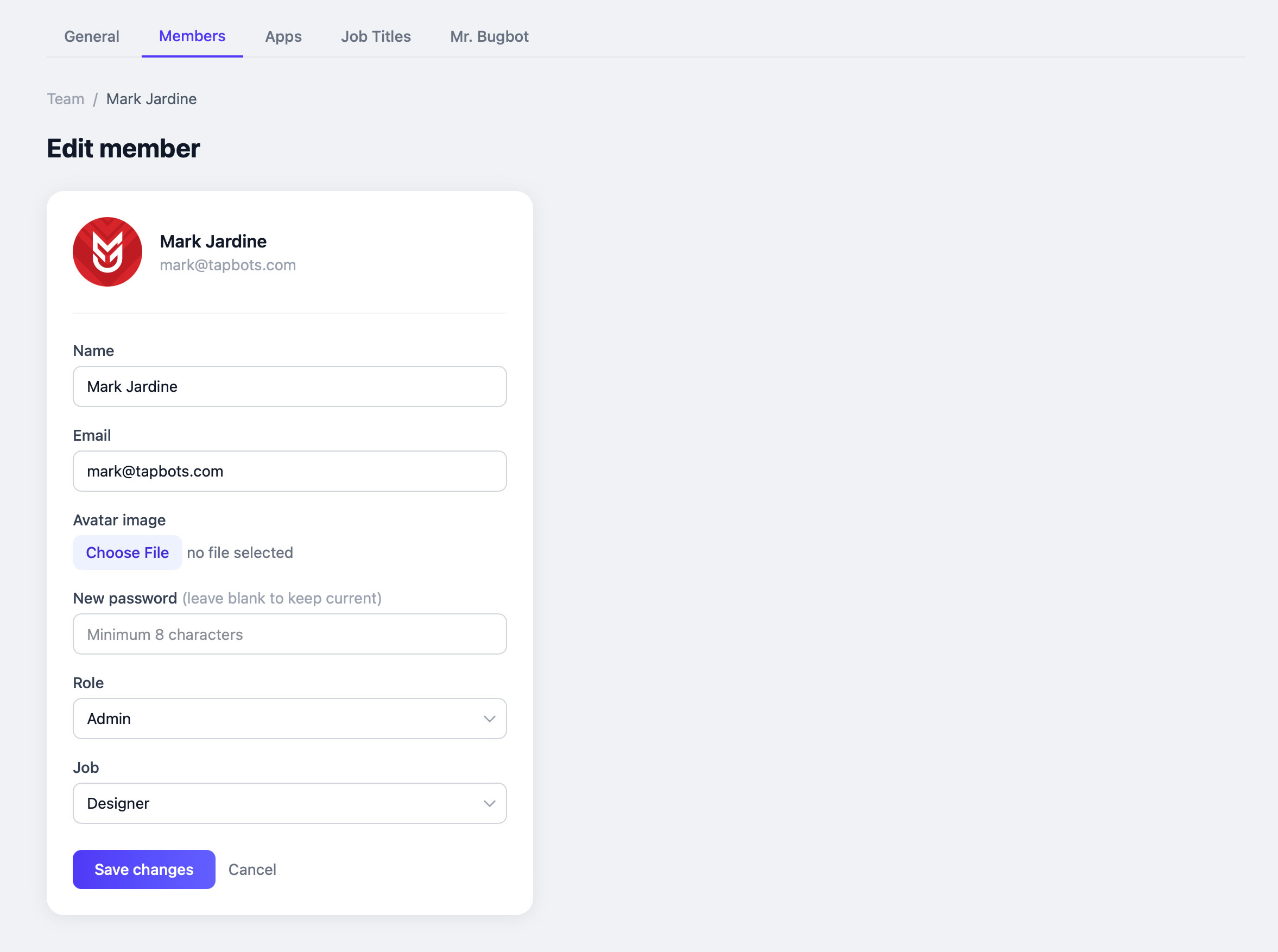
Here’s the data stored for each member. I’m showing this because there’s a “job” field. That’s for the random job titles you get depending on whether you are a designer or developer.
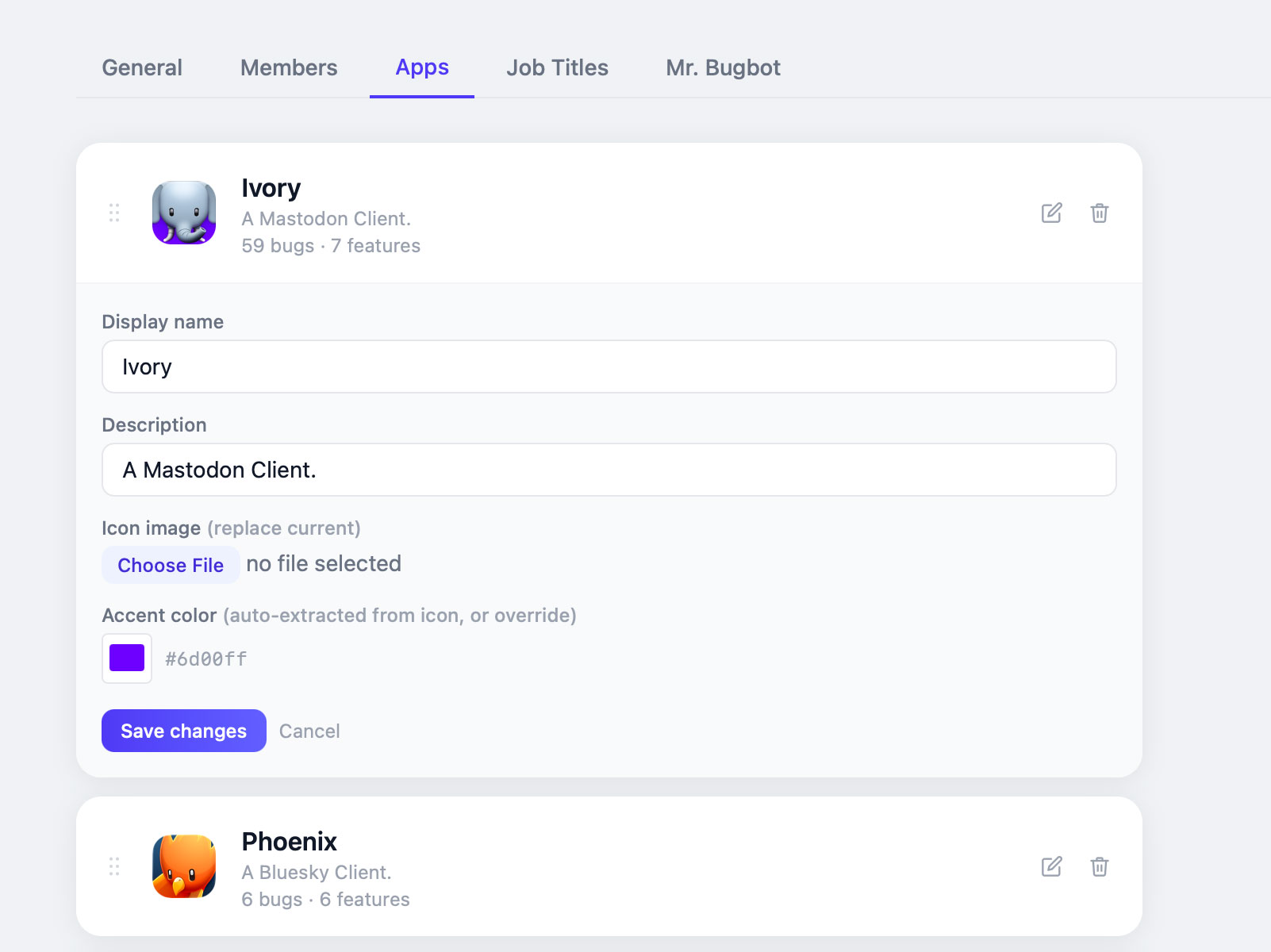
Apps is where you can add/edit apps and set their order which is reflected in the menus. When you upload an icon for an app, the website automatically chooses the most dominant color in the icon, but you can also click on the swatch and pick whatever color you want.
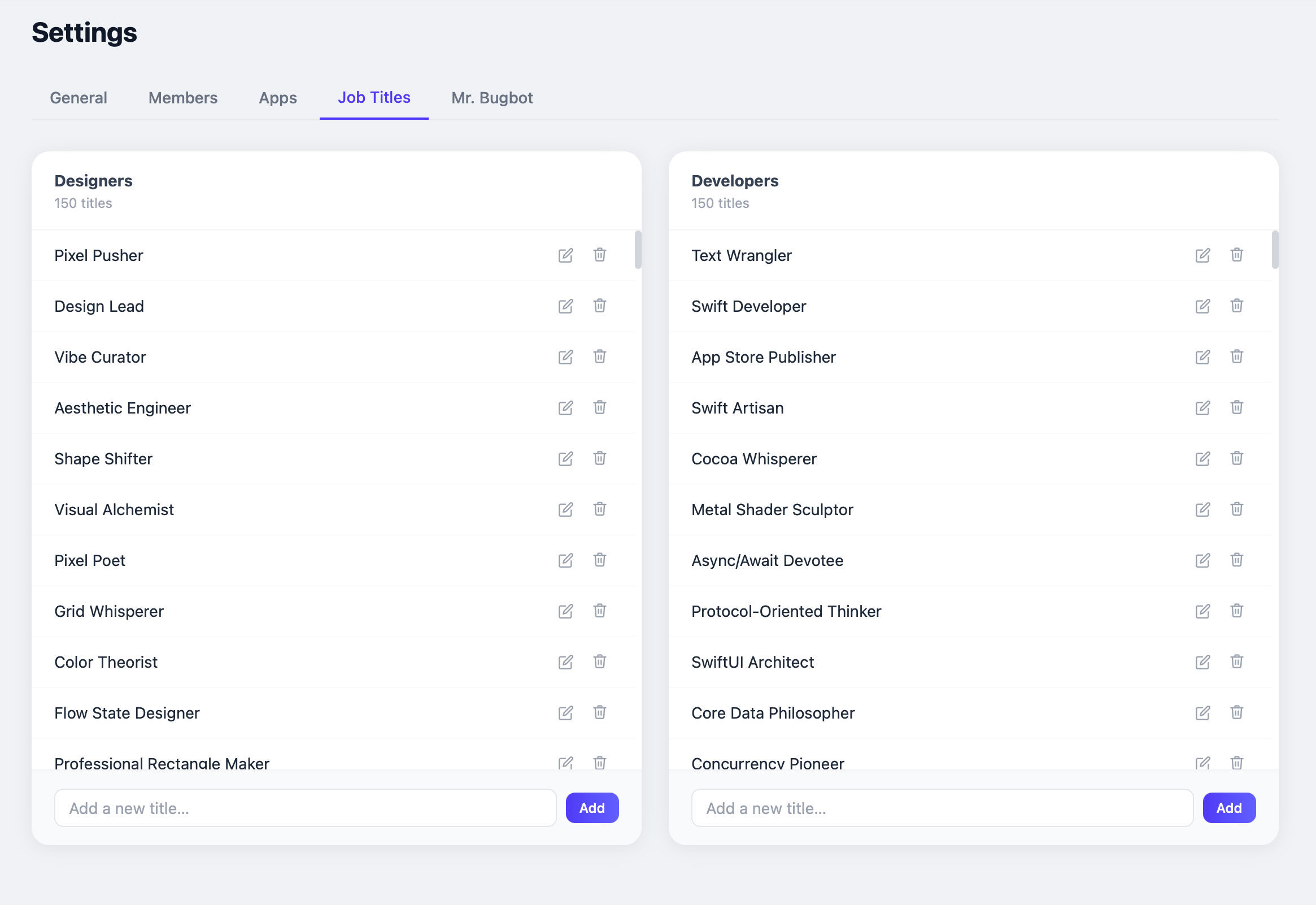
So many job titles! I’ll admit, I had Claude generate almost all of the jobs (based on various criteria), but we can always manually add funny ones we think of for each other.
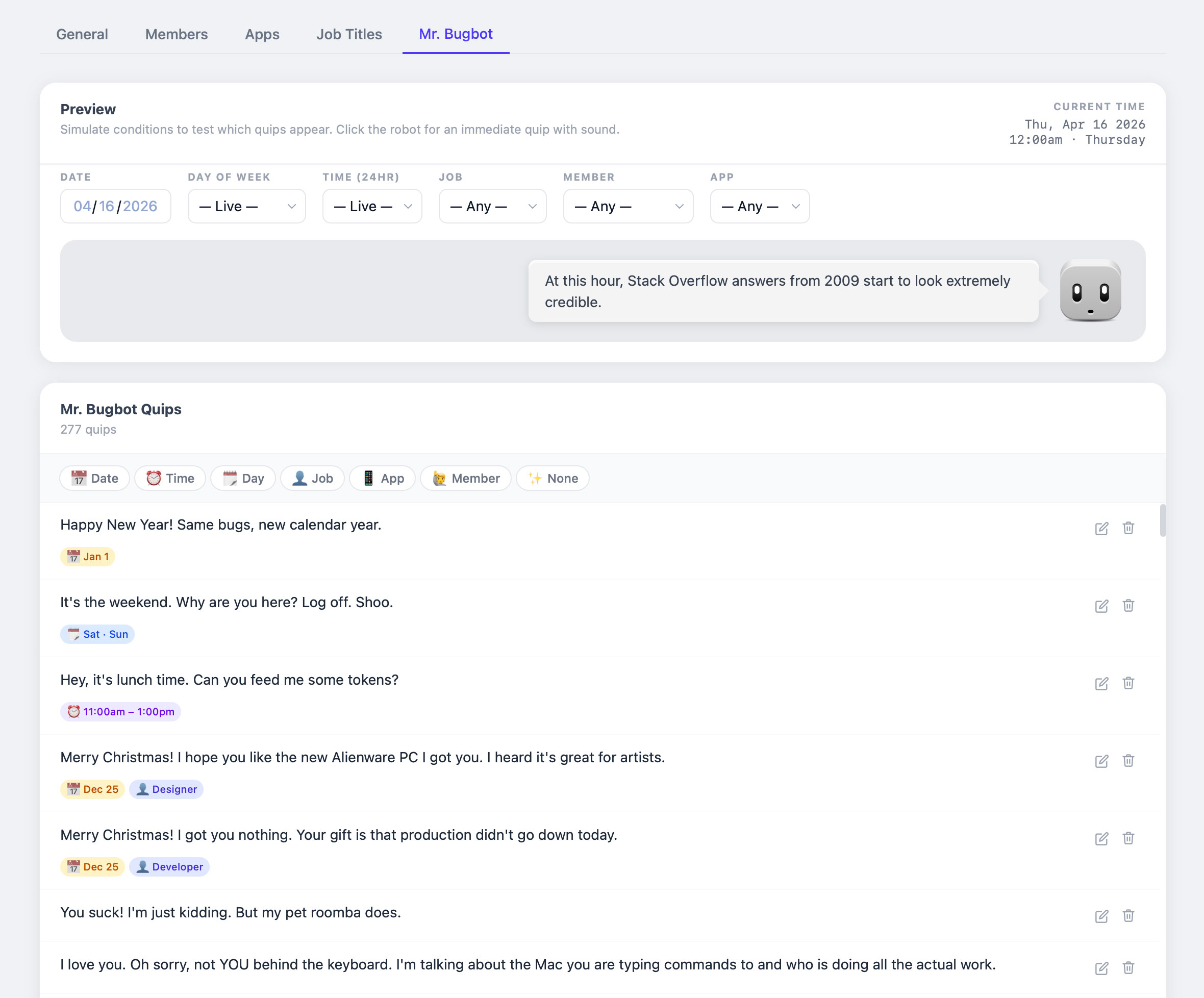
And probably the most insane part of this website…a feature in which no developer would ever waste so much time building for a bug tracking app…Mr. Bugbot. This settings page is for creating and testing Mr. Bugbot quips, and the criteria for when one shows up is practically endless! I’ll be honest, I racked my brain trying to come up with this and if it wasn’t for the help from Claude, I wouldn’t be smart enough to come up with the game plan around how how to make this, let alone developing it. The top preview area allows me to simulate all the scenarios to see what quips show up that match the criteria.
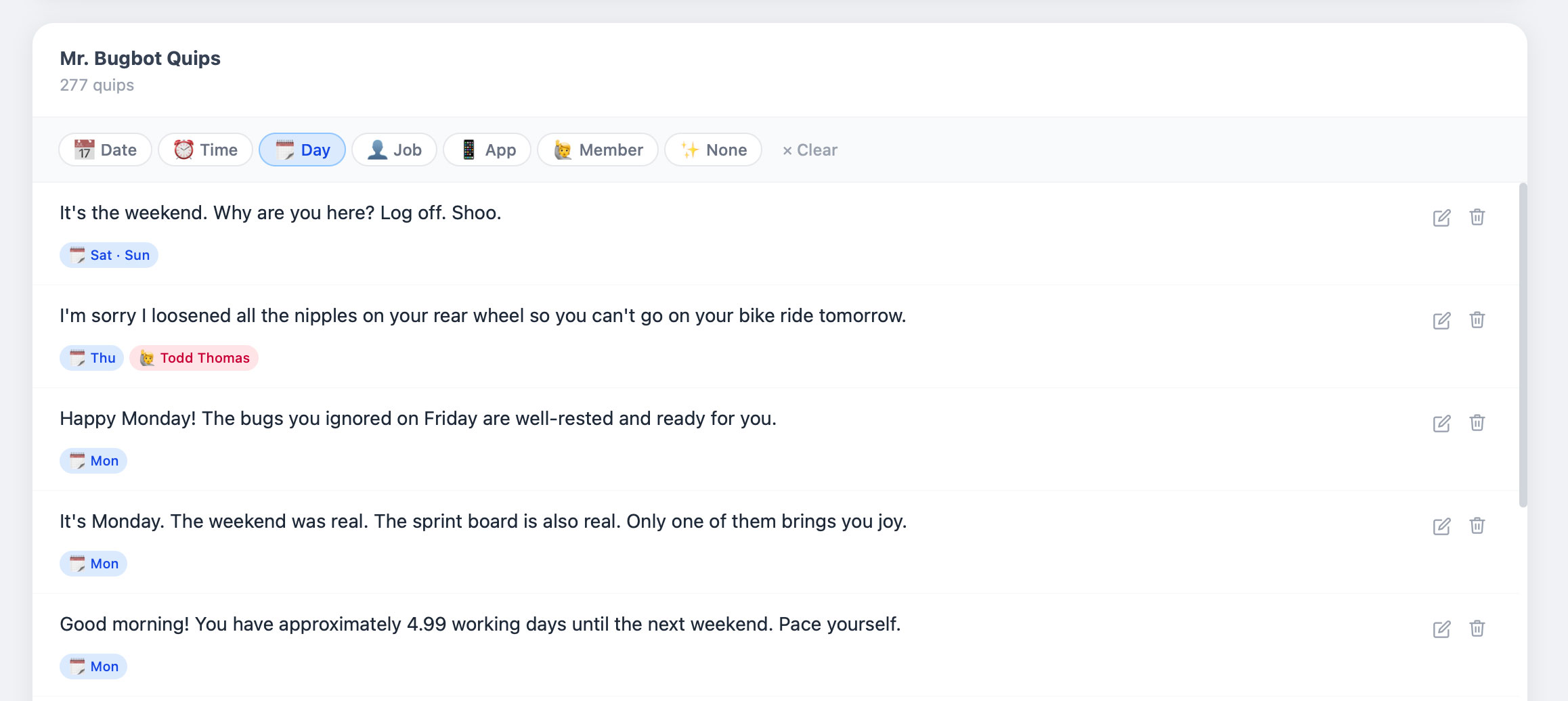
This is a list of all the quips that have been generated (I created some as well, but mostly generated). You can filter by different criteria (I like the one I added for Todd on a Thursday because Fridays are usually his riding days).
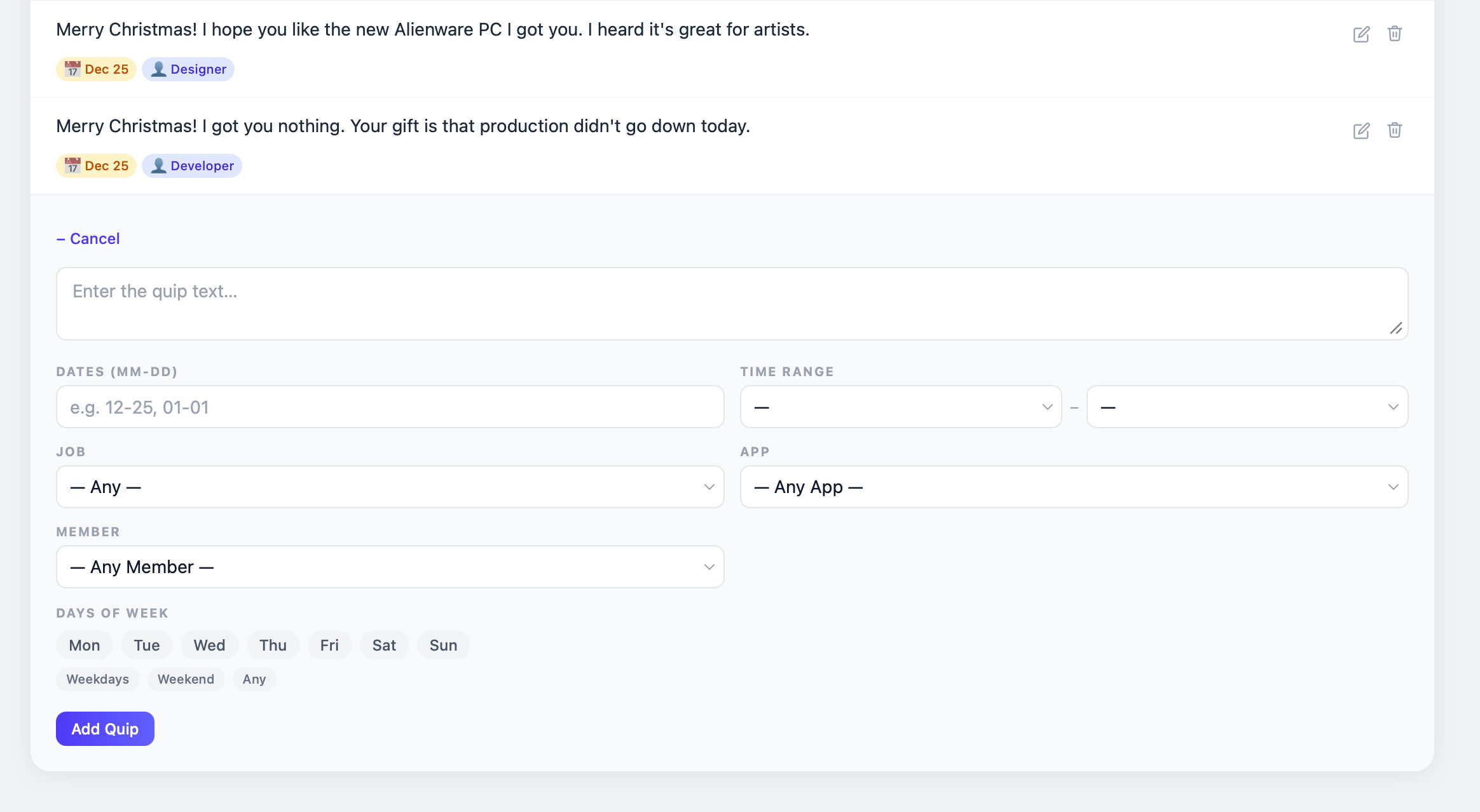
While most quips were generated by AI and the easiest way to add a bunch, you can add your own quips and choose from different criteria for when it is displayed.
Final Thoughts.
It is amazing to me that I’m able to use this fantastic bug tracking app that did not exist a few weeks ago. It’s mind-blowing. I am absolutely NOT a developer, but I have a good understanding of how development works on the web and am familiar with all the technologies needed to build an app like this. But I didn’t write any markup, any CSS, any JavaScript, nor did I do any design work (besides quickly throwing together that Mr. Bugbot head).
Claude chose to use Tailwind CSS, and I went with it because it looks good enough and I wanted to focus on UX and usability over every design detail. Obviously, I made general design choices like “make this text bigger, make that background header darker, add more margin/padding here, etc”. I did a ton of art directing (loosely because I knew this was Tailwind CSS). But I did pour all my experience and judgement into making this the best bug tracking software I could make and I think it’s worlds better than anything I’ve used in the past. That’s just…incredible.
As amazing as this is, I wouldn’t build anything that I cared about or wanted to put my name on like I did this website. When it comes to any public-facing website, I will always write my own code/markup and use Claude as a resource to help me solve problems I am incapable of doing myself. I care about the craft that goes into my work too much to let someone/something else do it without care. But this an internal tool for 3 people to use and work together and it does an amazing job at it. The best part? When one of us doesn’t like how something works or wishes it had some specific feature? Changes are made in minutes and everyone is using an improved version the next morning.
Note: Screenshots are captured from the actual functioning app on my test server. All the ticket data in these screenshots is fake. While I typed in gibberish when testing things, most ticket data was generated by Claude for testing purposes. I also used Sonnet for 99% of the work. I ran into a few issues trying to get Mr. Bugbot laid out visually which kept failing me so I tried switching to Opus, but turned out it was most likely a complex CSS/browser rendering limitation.
❤️ Enjoyed this post? Share it on your socials and don't forget to subscribe to the feed in your RSS reader!
